
Your account
Usernames & avatars
Choose a unique name and your character in the arcade.
Put your name on the cabinet#
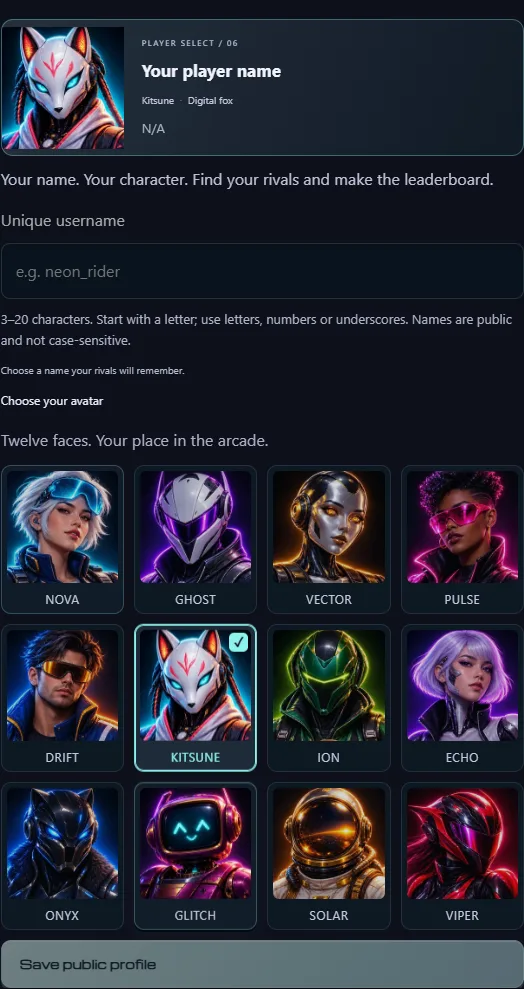
Connect from the header, then open the account button to reach Your account. Choose a username and avatar, then Save profile. Successful confirmation closes the editor. The preserved V4 arcade has its original profile editor.
Your profile is optional. Playing without one displays your shortened wallet address.
Pick a unique username#
Use 3–20 characters, starting with a letter. Letters, digits and underscores are accepted; names are normalized to lowercase. Neon_Rider and neon_rider are therefore the same name.
Save profile performs the contract's authoritative uniqueness check and requests the owner's signature. If someone saves that name first, choose a different one. Names from the migration snapshot are reserved for their original wallet owners; saving claims that reservation. A public name never changes the address derived from your passkey.
Choose your character#
The roster contains Nova, Ghost, Vector, Pulse, Drift, Kitsune, Ion, Echo, Onyx, Glitch, Solar and Viper. Select a portrait to update the large preview, then save. Character names are shared presets; your username is what must be unique.
You can use arrow keys within the roster, Home/End for its first/last character, and Tab to leave. The selected border and checkmark identify your choice. There is no image-upload feature in this release.
Where your profile appears#
Your saved username and avatar appear in invitations, the scoreboard and the leaderboard. F5 reloads the profile from its Monad registry. Until a reserved profile is claimed, the account editor offers its previous name and avatar for saving.
Public names and avatars are separate from private notebook nicknames and notes. Unsaved changes are not a published profile. Historical registry transactions remain public even after a later edit.